
Lean-Case Tutorial - The eCommerce Template
Overview
This tutorial shows how to create a Lean-Case eCommerce model with a Get-Customer-Phase modelling the Lead-Generation Process of creating leads and converting them into customers and a Keep-and-Grow-Customer-Phase modelling the Buying Process of driving first time buyers to become loyal buyers. You learn how to set up all revenue streams across those two phases, connect the streams with conversion rules and validate the mechanics of your model. We are also showing you how to add all elements to calculate your unit economics - cost of goods sold and cost of selling. After learning these basics, you can get started to adjust your model.
All steps are described below and illustrated in video sequences.
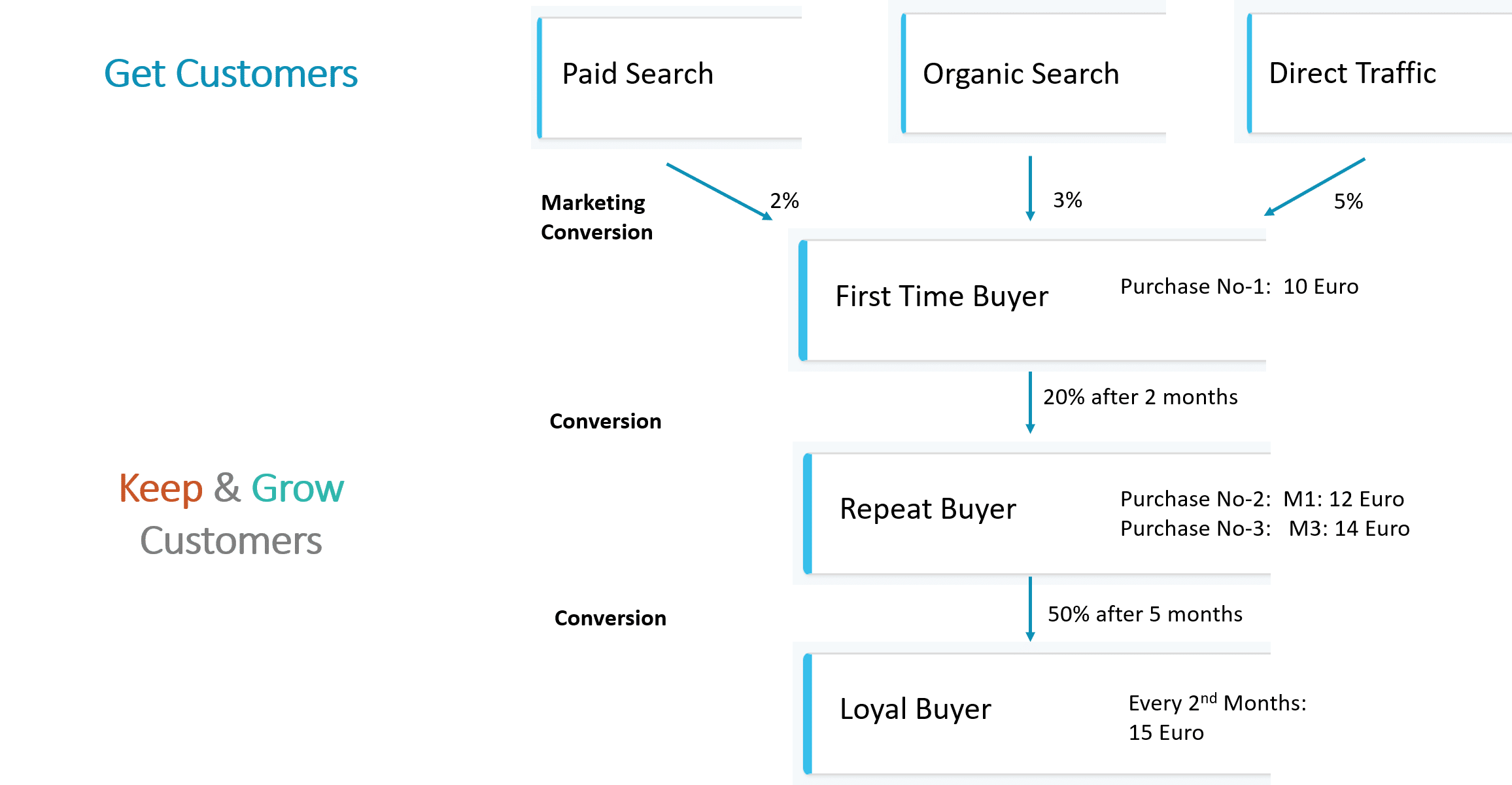
For a Lean-Case SaaS B2B model, we break down the customer life cycle into two main phases. Each of which has a number of stages.
1. The Get-Customer-Phase models the Marketing Process of converting leads into first time buyers. We use the following three marketing channels to create leads are:
2. The Keep-and-Grow-Customer-Phase models the Buying Process on creating first time buyers and ideally converting them into loyal, long-term customers. This includes three stages:
This tutorial shows you how to
Step 1: Set up the Get-Customer-Phase for All Revenue Streams
In Lean-Case Menu “Revenues”, we add all marketing channels of the Get-Customer-Phase as so-called revenue streams which model different revenue types (e.g. subscription revenues) and which can include several customer contracts - in an eCommerce context this could be used to model different products. Even though leads in the Get-Customer-Phase don’t create revenues, we use revenue streams to be able to set up forecasts and revenue related cost.
For the first marketing channel “Paid Traffic”:
Repeat the same procedure for the other marketing channels with:
Step 2: Set up the Keep-and-Grow-Customer-Phase
Using the same procedure as above, set up a revenue stream for each of the three stages in the Keep-and-Grow-Customer-Phase.
As outlined in Step 1
In addition, fill the revenue section with data for the average purchase behavior of your buyers. You have to enter the lifetime, the buying pattern and the revenues of your typical customer. Let's describe this for your first time buyer and assume that a first time buyer has a lifetime of 2 months before he decides to buy again or churn. During this time, this first time buyer buys 1 product in the first month at a price of €10:
Repeat these steps for the other two stages "Repeat Buyer" and "Loyal Buyer"
Step 3: Set up Conversion, Time Delay and Volume Metrics
When getting, keeping and growing customers, there are always four different types of metrics at play. These include:
Set Volume Metrics
The more leads you generate, the higher is the volume. As we have seen in Step 1, Volume Data to create new leads is entered in tab "Forecast"
Set Conversion and Time Delay Metrics
After addressing as many leads as possible, it becomes a matter of converting as many of them as fast as possible to become first time buyers. We can add conversion rules to each revenue stream connecting all the stages with Conversion Rate and Time Delay Metrics.
Let’s assume that 2% of all "Paid Traffic" leads convert into First Time Buyers after 1 month.
- Conversion Rate: under the “One-Time Conversion Rule” box, input a rate of 2%
- “Move From”: select the revenue stream and contract type from which customers convert (here: stream “Paid Traffic” and plan “Paid Traffic”)
- “Move To”: select the revenue stream and contract type to which customers convert (here: stream “First Time Buyer” and plan “First Time Buyer”)
- Time Delay: enter the number of months it takes before conversion takes place. This is assumed to be 1 month
- Click button “Save” to save the changes to the revenue stream
Repeat the above steps so as to connect each of the marketing channels and revenue stages with conversion rules. Following the same procedure for all subsequent revenue streams:
Click button “Save” to save the revenue streams.
Step 4: Validate Conversion Rules and Revenues
Let’s now verify our model by validating the conversions mechanics and revenue patterns. This is a good step to get comfortable with the way Lean-Case works and calculates.
Verify Conversion Mechanics
To validate if your conversion rules work as intended, follow these steps:
Repeat and validate the same steps for the next stages:
Verify Revenue Pattern
To validate if your revenue patterns work as intended, follow these steps:
Step 5: Add Cost of Goods Sold to Keep-and-Grow-Customer stages
Cost of Goods Sold (CoGS) cover all the cost required to keep your existing customers running (looking at it differently: all cost still required in case you have stopped any new customer acquisition). We want to show you a few different ways how to add different cost types – based on time, based on volume drivers and based on percentages.
Let’s assume that we have a “Time-Based Cost” for Hosting of 100 per month.
In addition, let’s assume a “Volume-Based Cost” of $5 as a product purchasing cost. The driver for this cost is the "Units Sold"
- Selecting the driver “per Units Sold” and
- Selecting the revenue stream “First Time Buyer” for which this driver should apply
Repeat the last step also for revenue streams "Repeat Buyer" and "Loyal Buyer" to ensure that the Cost per Unit Sold is captured for all purchases by the customer across his lifetime.
After clicking “Save” to store the COGS inputs, you can check the COGS by revenue stream and period.
Step 6: Getting started
Congratulations! The basic structure of your model is setup and validated
Now your can start to adjust all assumptions, in particular add volume over time.
Let us know if we can help

